Wizards jade
Hello apprentices of all ages. Let us take for a minute and thank those that came before. Wizards of Yore left us the ability to cast into all of time our thoughts. What a blessing it is. Anyway poetic waxing out of the way.
Crafting some payloads for Microsoft Office can take many forms. With the advancements made by Windows we now have the Mark of the Web (MOTW) Here we can see the first line of defense protecting users from the most basic of Phishing, Granted this is only in effect if the Defender of said network have disabled the now DEFAULT setting of alerting users of Windows Macros that do not come from internal emails, domain locations or with certs signed by some internal team.
This must be disabled as it is now enabled by DEFAULT!!
Let us deconstruct these incantations,
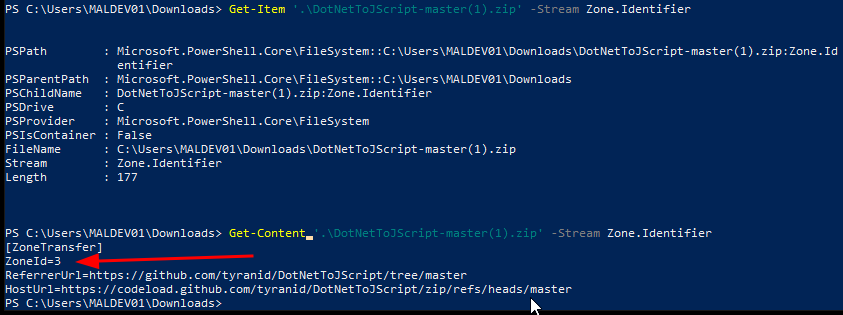 In the above picture we can see an example of the dreaded ZoneId=3
- ZoneId=0: Local machine.
- ZoneId=1: Local intranet.
- ZoneId=2: Trusted sites.
- ZoneId=3: Internet.
- ZoneId=4: Restricted sites.
MSDN in its classic Necronomicon like nature will hint but never outright tell us the dang answer. https://learn.microsoft.com/en-us/previous-versions/windows/internet-explorer/ie-developer/platform-apis/ms537183(v=vs.85)
But we can see the structure is the same as the methods used for Safe internet browsing.
So its been a bit and coming back to this it is making less sense for this to be done from outside the domain. However, I will never discount the method. Its just becoming more and more difficult for people to click enable macro's now that is to say once you make entry on a network being sent from internal is a really nice strat. Doing the OSEP has you do something similar but I enjoy the process of enumerating users via the mail server with manual interaction.